
1. What Is Building Information Modeling (BIM)?
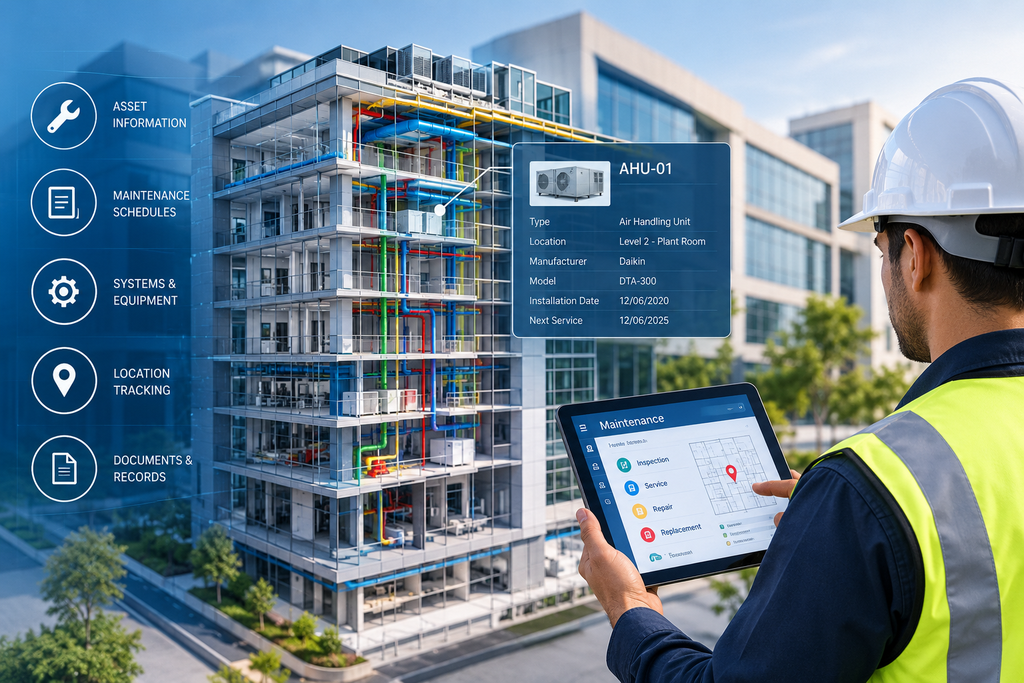
A building may look complete when the construction team hands over the keys, but the work of looking after it continues for years. Air-conditioning units need servicing, electrical systems need inspections, and pumps may need replacement. Maintenance teams need accurate information to do this work properly. Building Information Modeling (BIM) links a 3D model of the building to facts about each part inside it. Depending on how the model is built, it can hold details about walls, doors, mechanical equipment, electrical installations, plumbing and other assets.
For maintenance, this means staff can:
- Identify equipment
- Check specifications
- Find where each component sits
For example, if a technician needs to inspect an air-handling unit on the third floor, the model can show its location, equipment reference and technical documents. There is no need to search through several folders. A model only helps maintenance when its records are correct and current. A detailed 3D model with weak asset records looks impressive but saves very little time. Our BIM modeling team builds models with this kind of day-to-day use in mind.
2. How BIM Is Used in Building Maintenance Work
BIM brings building information into one organised place. The exact use depends on the model, the data and the software your facility team uses.
- Equipment identification: Staff can find an asset and see its manufacturer, model number, installation date or manuals, if these have been recorded.
- Inspection planning: If the model is linked to a maintenance management system, equipment records can connect with service schedules, inspection dates and work orders.
- Faster searching: In a large building with many plant rooms, finding one pump and its service history is easier when records are organised.
BIM does not schedule services or warn staff about faults by itself. These functions need extra software, reliable asset data and an agreed maintenance process.
3. Connecting Building Systems, Equipment and Asset Information in BIM
A building has many connected systems. A distribution board feeds different areas, plumbing serves many rooms, and mechanical equipment handles heating, cooling and ventilation. Seeing these links makes maintenance easier to organise.
A useful maintenance record may contain:
- Asset identification: A unique equipment number, name and location.
- Technical details: Manufacturer, model, capacity and other specifications.
- Supporting documents: Manuals, warranties, installation records and approved drawings.
- Maintenance information: Inspection needs, service history and replacement details, where recorded.
- System relationships: Links to related equipment, rooms or building services.
Imagine a technician checking a water leak near a service room. A well-prepared model can show nearby pipes, valves and related equipment before the work starts. The team can then confirm the details with drawings and a site check. The model does not replace checking on site. Buildings change over time, and undocumented changes make older records unreliable. Treat the model as a useful reference backed by physical inspection.
4. Using BIM to Identify Maintenance Needs and Plan Servicing
Maintenance becomes hard when teams only react after a problem appears. A better approach separates routine preventive maintenance from repairs done after a fault.
- BIM helps teams identify assets, review specifications and find the information needed to plan servicing.
- When linked to a maintenance platform, these records can support recurring inspections and scheduled work.
- For ventilation equipment, the model shows the unit and its location, while the maintenance system records the due date, technician and completion status.
- The same method works for pumps, fire protection equipment and electrical installations, following the relevant technical rules.
Planning also depends on how the building is used. Equipment serving a busy public area needs a different plan from equipment in a rarely visited plant room. Teams should consider manufacturer guidance, local regulations and what happens if the equipment fails. BIM keeps the information organised. Decisions about when to service or replace equipment still rest with experienced maintenance staff.
5. Managing Repairs, Inspections and Equipment Replacements with BIM
When something stops working, staff need to understand the problem, find the affected part and restore normal operation. Missing drawings or old records slow this down. BIM gives a visual reference that helps staff see the affected area and nearby systems before work begins. This helps most when several services share the same ceiling space, riser or plant room.
Suppose an owner plans to replace an old circulation pump. The team first needs to confirm:
- The pump’s location and dimensions
- Its connections and specifications
- Access routes, such as narrow doorways or crowded plant rooms
The model may provide some of this, while manuals and site measurements fill in the rest. After any repair or replacement, update the records. Add the new equipment details, revised drawings and maintenance documents to the agreed system. Without this step, the model slowly becomes less reliable.
6. Keeping BIM Information Updated as Buildings Change Over Time
A building rarely stays the same after handover. Tenants change layouts, equipment gets upgraded, new partitions go up and services are modified. These changes create a gap between the digital model and the real building. Outdated information wastes time and can lead to wrong decisions.
A good update process should:
- Name who is responsible for updating the model
- List which changes must be recorded, such as equipment replacements, service route changes and layout changes
- Include a check before updates are approved
Older buildings may need verification before the model can be trusted. Where drawings are missing or do not match the site, 3D laser scanning can capture the current condition accurately. The scan data can then be turned into updated CAD drawings and model information after proper checking. Updated models also give a clean base for future drawings. See how Revit BIM architecture drawings can be kept in line with what is actually built.
7. How BIM Makes Building Maintenance More Efficient and Manageable
The value of BIM comes from making useful information easier to find and use. The benefits depend on how well the model matches the building and how regularly the team uses it.
- Quicker information retrieval: Equipment locations and records are easier to find.
- Better maintenance preparation: Technicians can check specifications and access needs before visiting an asset.
- Improved coordination: Facility managers share one common reference for repairs and changes.
- More organised asset records: Equipment details and documents link to building components.
- Better replacement decisions: Asset information helps teams judge condition and compatibility.
- More reliable handover information: Future teams get a clearer picture of the building.
BIM does not replace skilled technicians, statutory inspections or a maintenance management system. A sensible start is to list the most important assets, decide what information each one needs and agree how the model will be maintained.
Conclusion
BIM gives maintenance teams one clear place to find equipment details, plan servicing and record repairs. It works best when the information is accurate and updated after every change. To build or update a model for your building, contact the ASW team.
Frequently Asked Questions About BIM for Building Maintenance
1. What is BIM for building maintenance?
It is using a building’s digital model and asset data to find equipment, check details and plan maintenance work.
2. Can BIM help with preventive maintenance?
Yes, it supports planning by giving asset locations and details. Automatic reminders need maintenance management software.
3. What should a maintenance BIM model contain?
Asset IDs, specifications, locations, manuals, warranties, inspection needs and maintenance records.
4. Can BIM be used for an existing building?
Yes. Drawings, site measurements and 3D laser scanning can help build or update the model.
5. Does BIM replace facility management software?
No. BIM holds the model and data, while facility software handles work orders and schedules. The two can be linked.
6. Who updates the BIM model?
The owner, facility team, BIM coordinator and contractors should agree on this at the start.