
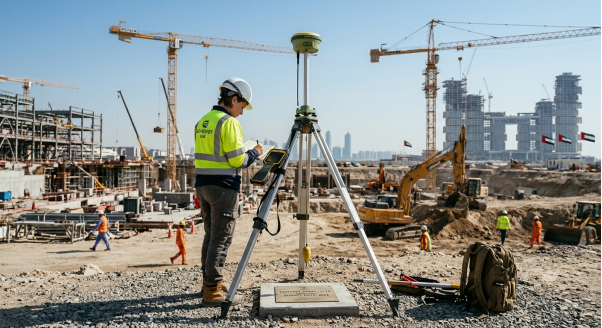
Ask most site engineers how long a GPS point takes, and they will say a few seconds. For an RTK shot, that is true. For the control point behind every other measurement, however, it is not. A control point may need a receiver over it for two hours or more. Sometimes it needs longer. This method is called a GPS static survey, and the waiting is what gives it strength. In this article, we explain how the method works and why the time matters. We also show how to judge the result, and when RTK is the better choice.
What a Static Receiver Actually Does on the Ground
In a GPS static survey, the receiver stays still. It is set up over a marked point and left to record satellite signals for a fixed period. Unlike RTK, nothing is corrected live. The receiver simply logs raw data. The answer comes later, in the office, when software compares the logs.
At least two receivers work at the same time, and often three or more. Each sits on a different point, and all of them record the same satellites. Because of this shared view, the software can measure the distance and direction between the points very precisely.
These are dual-frequency geodetic receivers. They track several satellite systems, such as GPS, GLONASS, Galileo and BeiDou. As a result, more signals are available. With good planning, the method can reach sub-centimetre accuracy.
Why One Point Takes Two Hours and Another Takes Six
The receiver measures the phase of the satellite signal, not just its timing. That gives much finer detail. However, it also creates a puzzle. The receiver knows where it sits within one wave, but it cannot tell how many whole waves lie between it and the satellite. Solving that count is called ambiguity resolution, and it needs time. As the satellites move across the sky, the geometry changes. Gradually, the software rules out the wrong answers until only one fits.
Several things decide how long this takes:
- Baseline length. A point a few kilometres from the reference settles faster than one tens of kilometres away.
- Satellite count and spread. More satellites, well spread across the sky, shorten the wait.
- Sky view. Walls, towers and cranes block signals, so clean data takes longer to collect.
- Atmosphere. The ionosphere and humid air bend the signals, and the effect grows with distance.
- Accuracy needed. A project control point needs more data than a quick check.
For this reason, two points on the same site can need different session times. A point in an open plot may finish in about two hours. Another between buildings may need six.
Setting Up Over a Control Point: Tripod, Height and Sky View
Good data starts before the receiver is switched on. In fact, the setup over the point matters more than most people expect. First, the surveyor centres the tripod over the mark with an optical plummet or laser, then levels it. A small centring error goes straight into the final coordinates. Next comes antenna height. The crew measures it at the start and again at the end of the session, usually in two different ways. They then write it in the field log. A wrong antenna height is a common cause of a bad vertical result. Because the error is silent, only a second check will catch it.
Then there is sky view. The surveyor looks for anything that blocks or reflects signals, such as trees, boundary walls, parked trucks and tower cranes. Metal surfaces are especially bad, because they bounce signals and cause multipath error. Many crews also set the elevation mask at around 10 degrees, so low and noisy signals are ignored.
Finally, the crew records the point name, start and end times, serial numbers and site notes. This log feels like paperwork. Still, it saves the day when a number looks wrong later.
Baselines and Sessions: How the Points Tie Together
A baseline is the measured line between two receivers. A session is the period when those receivers record together. Together, many baselines across many sessions build a static job. Here is a simple example. Three receivers occupy points A, B and C for two hours. That is one session. Then one receiver moves to a new point, D, while the other two stay where they are. In the second session, D becomes tied to the earlier points.
Good practice makes each point part of more than one baseline. That way, a mistake on one line shows up as a disagreement with another. A network built like this is called redundant, and redundancy makes errors visible. Some points also tie to known reference stations or existing control. As a result, the whole network sits in the right coordinate system.
What Happens to the Data After the Receivers Are Packed Away
Packing up the equipment does not end the job. In fact, the real calculation starts now. First, the raw files are downloaded and converted to a common format, usually RINEX. Next, data from reference stations is added. The software then processes each baseline and reports how well the ambiguities were solved. After that, a network adjustment spreads the small disagreements across all baselines. It also holds the network to the fixed control. The output is a list of coordinates, with an uncertainty estimate for each point.
One more step deserves attention. GNSS heights are measured from a mathematical ellipsoid, not from the level surface used on site. Therefore, the coordinates must be moved into the project grid, and the heights need a geoid model or ties to levelled benchmarks. Skipping this step is a common reason why GPS heights disagree with site levels. Each emirate has its own requirements, so confirm the grid and height datum before processing starts. In Abu Dhabi, check with the Department of Municipalities and Transport (DMT).
Checking the Result: Closures, Residuals and Repeat Observations
A table of coordinates looks convincing whether it is good or bad. For that reason, the checks matter.
- Loop closures. Baselines that form a closed loop should add up to almost zero. A large misclosure points to a problem.
- Residuals. After adjustment, small and even residuals suggest the data agree. One large residual often traces back to a single bad session or a wrong antenna height.
- Repeat observations. Reoccupying a point at a different time of day gives an independent result to compare.
- Known points. Checking one or two existing points left out of the adjustment shows whether the network fits the project.
A surveyor should be happy to share these numbers. A good report lists the instruments, antenna heights, session times, processing settings and adjustment results, not just the final coordinates. You can read more about the instruments on our equipment page. Likewise, our working steps are set out under methodology.
When RTK Is Enough and When Static Is Worth the Wait
Static is not always the right tool. For many tasks, RTK does the job faster. RTK gives results in seconds by using live corrections from a base or a network. It suits site detail, boundary pickup and setting out, where speed matters and centimetre-level results are enough.
On the other hand, static is worth the wait in several cases:
- Establishing the main control for a new site or a long corridor
- Points far from any reference station
- Monitoring settlement or movement over time, where small changes matter
- Checking existing control before work starts
- Any point where a mistake would spread into every later measurement
Most projects use both. Static sets the control once, with checks. After that, RTK and total stations work from it all day. If the base is wrong, every RTK shot inherits the error, however fast it was collected. Our GPS team plans this mix for each project. We set control with static observation first. That framework then supports topographic work and later setting out. To see how satellite and optical methods share one job, read our hybrid guide to GPS and total station work.
Conclusion
A GPS static survey takes patience, but it buys confidence. The hours spent over a control point cost far less than rebuilding work from a wrong coordinate. In short, use static where the numbers must hold for the whole project. Use RTK where speed matters more. Most sites need both, in the right order. If you are planning a project in Abu Dhabi or elsewhere in the UAE, contact our team to talk through your control.
Quick Answers on GPS Static Survey
How long does a GPS static survey take?
A single session usually runs from about one hour to several hours. The time depends on baseline length, sky view and the accuracy needed. A full control network can take a day or more.
How accurate is a GPS static survey?
With good planning, results can reach sub-centimetre level. The final figure depends on session length, satellite conditions and the quality of the adjustment.
How many receivers does a static survey need?
At least two. Many jobs use three or more, because extra receivers speed up the work and add checks.
Can static survey work between tall buildings?
Yes, but sessions often run longer. The surveyor also picks points with the clearest sky. Where that is not possible, an offset point is set up and tied in with a total station.
Why do GPS heights differ from my site levels?
GNSS heights come from an ellipsoid, while site levels follow a local datum. A geoid model or levelled benchmarks closes the gap.